One of my favorite features in twitter is being able to create twitter lists. The twitter list feature is one of the best features in the platform because it allows you to segment updates from those you follow in particular categories.
One other interesting element to twitter lists is that you don’t have you be following someone to put them in a list. Which means your tweet stream can stay nice and clean with only people you want to be hearing from.
Here are the exact steps you must take if you want to create a twitter list.
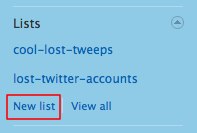
On the right hand column of twitter you will see a section for lists. Click the button that says “new list” as shown below
Then this will pop up
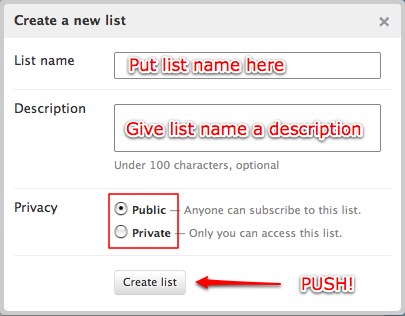
Once your list is created then you are ready to add people to your list!
Here is how to add someone to your twitter list
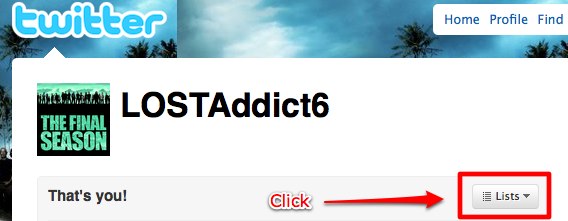
Open up their profile like so and click the little “Lists” button.
Which will then drop down the menu to add the person to a specific list…
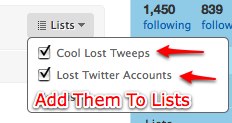
Once your list has been created, and you have added the person to the list. Go back to your main twitter page and click the list name so you can see all the tweets from the people you have added to this list.
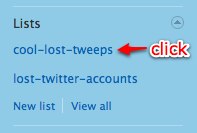
There you go! You are able to now only see and pay attention to the tweets from the people you have added to this list.

——————————————————————————————————-
The Bottom Line: Adding someone to a twitter list is the first step into increasing your efficiency using twitter.
——————————————————————————————————-


May I Suggest...
Read More Articles
Free Productivity Training
- How To Make More Sales and Keep More Profit in Your Business
- How To Create A Social Media Strategy: For Companies Who Already Have A Customer Base
- How To Position Your Product Effectively in The Marketplace (Just Answer These Three Key Questions)
- The 15 Questions You Must Know the Answer To Before Creating An Effective Marketing Campaign
- 3 Reasons Why Having A Content Strategy is Essential For Your Blog and Your Business




{ 6 comments… read them below or add one }
Lists are great, but once you have 100s people you follow, having to add them one by one to a list is awful.
Any tool to help on that? I cant find….
Thanks
Agnes – Thank you for your comment.
I don’t know of a tool like that. I would use Google to see if they have come up with something you could use.
I started a brand new account for this reason. When I first started twitter, they didn’t have lists.
I was trying to find a tool to make adding people to lists easy too but like Agnes can’t find anything. Having nearly 10k followers this is not an easy job. Click – select add to list – check box – close – repeat just isn’t fun when you have to do it a few 1000 times.
I have added a person to my list by clicking on their profile and adding to my list. Twitter keeps on sending a message indicating error adding to my list.
Thanks for your help i have added two persons on my twitter keep it up.
This is an agonizingly SLLLLLLLOOOOOOOWWWWW way to do it. They need to come out with another method. I don’t have time to go through all the people I follow one-by-one.